Software · July 22, 2026
Imagine your marketplace sales landing in your accounting software on their own, already sorted into the right accounts, with no manual entry or end of month catch up. Acceby does this and more. It reads your sales and fees, records them correctly in GnuCash, QuickBooks, or Xero, and keeps your books up to date while you get on with running the business.
This guide takes you from a fresh install to your first successful sync.
What It Actually Does
Acceby is a desktop app for Windows, macOS, and Linux. Running on your own computer means Acceby moves your data straight to your accounting platform without it passing through anyone else's servers.
Each time you run a sync, the app:
- Retrieves the latest transactions from your marketplace provider.
- Each transaction is automatically allocated: sales become income, fees become expenses, and shipping, refunds, charges and payouts are all processed.
- Skips any transactions it has already imported, resyncing never creates duplicates.
Books reflect every business transaction, not a single lump sum payout lacking in detail.
Only eBay is currently supported, with more marketplaces launching soon. This guide applies whichever marketplace you choose to connect.
Before You Begin
Before you set up the software you will need:
- A seller account on a supported marketplace. You'll authorise the connection during setup so your data can be imported. The connection is made through the marketplace's own secure sign-in, and a token is securely transmitted back to the app for future authentication.
- A supported accounting platform. This is where your transactions are recorded. There are a number options to choose from, explained below. If you're just starting or want a free option, GnuCash is a capable choice, though it needs a little more setup.
Installing Acceby and setting up GnuCash needs no account at all. Connecting a marketplace does, but registering is free. You only pay when you want the paid features.
Installing Acceby
Install the app from the download page and open it. When you run it for the first time a setup wizard appears and guides you through each step. If you don't complete the wizard, you can resume it later.
Choosing Your Accounting Platform
The wizard's first step is choosing where your transactions will be recorded.
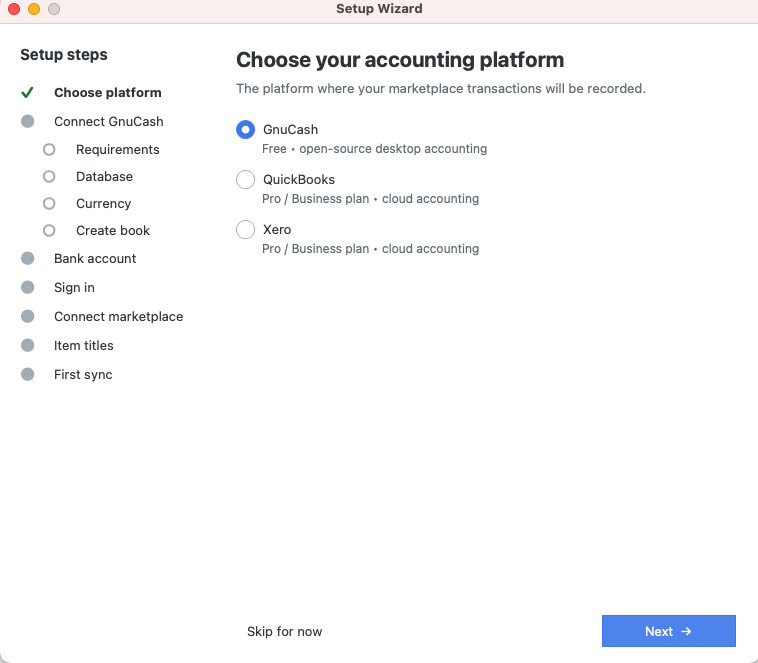
There are three platforms to choose from:
- QuickBooks is the natural choice if you're already in Intuit's ecosystem or your accountant works in QuickBooks. Connecting it requires a paid plan.
- Xero is popular with small businesses and the accountants who support them, and it connects just as smoothly. Like QuickBooks, it's available on a paid plan.
- GnuCash is free and open-source, and available on a free or premium plan. It's a double entry accounting package, for a seller wanting full control of their books. Acceby creates the GnuCash book for you during setup, so there's nothing to install beyond GnuCash itself. We've written a dedicated guide to set it up here.
Check out the features page to view the differences between platforms. The pricing page also illustrates the inclusions of each plan. You can start on GnuCash to see how everything works and move to QuickBooks or Xero later if you prefer. Your marketplace connection and settings carry over to other platforms, so you can change at any time.
Getting Connected
Once your accounting platform is connected, the wizard asks you to name the bank account your marketplace payouts are paid into. Every platform needs it, and Acceby creates the account for you on your first sync.
Signing in to Acceby comes before the marketplace step, and the Connect button stays disabled until you do, so sign in or register when the wizard asks.
Connecting your marketplace then happens through the marketplace's own secure sign-in. When you click to connect, the authorisation page opens in your browser, and you grant permission for the app to read your transactions. Acceby receives a secure token that lets it interact with your marketplace provider. Carefully select the region you sell in, because many marketplaces run separate regional sites, with different currencies. This determines the currency your transactions are recorded in, so set it to the region you selling in.
Online accounting platforms are authenticated in the same way using tokens. GnuCash runs on your own computer, so the wizard creates a book there instead. You can read the GnuCash setup guide for further information.
Your First Sync
With both connections in place, the wizard's final step is the Run first sync button. Clicking it begins the download process, and the data is synced to your accounting platform. When it completes, it's a good idea to view the transactions and verify it worked correctly. If everything worked as expected then you're all set up for future downloads.
Going Further
Automatic scheduled syncing
Available on a paid plan and is a great automation tool for keeping everything up to date with no manual input required. You can schedule it every few hours or once a day, whatever suits your needs best. This is one of the most popular features, and helps to make everything run seamlessly.
Multiple seller accounts
If you run more than one store, you can connect and sync several accounts, keeping each one's transactions cleanly separated.
Multi-currency support
Selling across regions, or into a different currency than your home one? Transactions are recorded in their native currency and work with your accounting platform's own multi-currency handling.
Reports
Pull a profit-and-loss view of your activity directly in the app, with date-range presets and an export option, so you can see how the business is doing without building the report yourself.
Richer transaction detail
The actual item titles from your listings can be included in each transaction's description, so your books read in plain English rather than bare order numbers. A customer record can also be created for each buyer in your accounting platform.
Safer GnuCash data
For GnuCash users, automatic backups can run on a schedule you choose, with restore controls, so your book is protected.
Some of these features are only available if you have a premium plan. The pricing page shows how the free and paid plans compare and it's easy to find the one that matches your needs.
Signing In and Your Account
Registration is free. You need an account to connect a marketplace, and a paid plan only for the paid features.
If you just want to set GnuCash up for now, choose Skip for now at the sign-in step. The wizard closes with your GnuCash settings saved, and you can sign in later when you're ready to connect a marketplace.
Signing up is quick: create an account with your name, email, and a password, then confirm your email. To link the desktop app, sign in on the website and paste the short activation code it shows into the app once. Forgot your password? Reset it in seconds. Two-factor authentication is there if you want extra security.
When You Need a Hand
If you encounter any issues, you can check the FAQ page for most common answers, and you contact us directly if you need support. That's everything you need to get started with Acceby. Here's to spending a lot less time on your accounting.